You open Search Console on Monday morning, and the impressions chart is climbing. Nice line, going up and to the right. Then you glance at the clicks chart sitting next to it, and it is basically flat. Same story most weeks. That gap between impressions vs clicks is one of the most useful signals you have, and a lot of teams either ignore it or read it backwards. It is also the first thing we look at when we run content analytics for a site, because it tells you whether your problem is visibility, relevance, or the words on your result.
This post breaks down what each number actually counts, why they almost never move together, and how to turn the difference into a short list of pages worth fixing this month.
What impressions and clicks actually mean in Search Console
Before you read the gap, you have to know what each number counts. They sound similar. They measure very different things.
Impressions
An impression is logged when one of your pages appears in someone’s search results for a query. The person does not have to click. They do not even have to scroll down to where your link sits. If your result was on the page they saw, that counts. So impressions are really a visibility number. They tell you how often Google decided your page was relevant enough to show, and roughly how much demand exists for the queries you show up for. Rising impressions usually mean you are ranking for more queries, or for queries that get searched more often, or both.
Clicks
A click is logged when someone actually taps your result and lands on your site from search. That is a much higher bar. To earn a click, your result has to show up, sit high enough to be seen, and then beat every other result on the page for that person’s attention. Clicks are a choice number. They measure whether people picked you once they saw you. When clicks stay flat while impressions climb, people are seeing you and choosing something else.
Why the two numbers rarely move together
Impressions and clicks are driven by different things, so they drift apart all the time. You can gain impressions just by ranking on page two for a popular term, which adds visibility but almost no clicks. You can lose impressions when a competitor outranks you, even though the people who still see you keep clicking at the same rate. A single viral query, a new SERP feature, or a seasonal spike can move impressions hard without touching clicks. Treating them as one health metric hides all of that. The space between the two lines is where the real story lives.
Read all four numbers, not two
Impressions and clicks are only half the picture. Search Console gives you two more numbers in the same report, and you need all four to diagnose anything:
- Impressions: how often you showed up. Demand and visibility.
- Clicks: how often people came. Actual traffic.
- CTR (click-through rate): clicks divided by impressions. How appealing your result was once seen.
- Average position: where you typically ranked. Context for the other three.
CTR is the bridge between impressions and clicks. A page with 10,000 impressions and a 0.2% CTR has a very different problem from a page with 300 impressions and a 9% CTR. The first one is seen constantly and ignored. The second one is rarely seen but very persuasive when it is. You fix those two pages in completely different ways, and you only know which is which when you look at position alongside the rest.
What high impressions and low clicks are really telling you
This is the most common pattern, and the most misread. Lots of impressions, very few clicks, low CTR. People see the rising impressions and assume the page is winning. It usually is not. Here is how to translate the pattern based on where the page ranks.
| What you see | What it usually means | What to do next |
|---|---|---|
| High impressions, low CTR, position 1–5 | You rank well but your title and description do not earn the click | Rewrite the title and meta description to match intent and stand out |
| High impressions, low CTR, position 8–20 | You are visible on page one or two but too low to get clicked | Improve the page so it climbs, or it stays a vanity number |
| High impressions, near-zero CTR, position 20+ | You show up for broad or loosely related queries | Often noise. Confirm intent before spending effort here |
| High impressions on a query you do not want | The page is matching the wrong intent | Refocus the content, or accept the query is not yours |
The lesson is simple. High impressions are not a reward. They are a question: are these the right people, and if so, why are they not clicking? When the position is strong and the CTR is weak, the answer is almost always your title and snippet. When the position is weak, no title rewrite will save you, and the work is to make the page genuinely better so it ranks higher. We dig into that trade-off in our guide on why website traffic is dropping.
What low impressions can be telling you
The opposite pattern gets less attention but matters just as much. A page with low impressions and a healthy CTR is not failing. It is starving. People who see it tend to click, which means the result resonates. The page just is not being shown enough. That points to a visibility problem, not a copy problem: thin topic coverage, weak internal links, low authority for the query, or simply ranking just below the fold of search demand.
These pages are some of the best investments you have, because the hard part is already done. The result converts attention into clicks. You only need to get it in front of more people. That usually means strengthening the content, adding internal links from related posts, and making sure the page is part of a real topic cluster rather than a one-off. Compare that with a high-impression, low-CTR page, where the traffic ceiling is there but you are leaking it at the door.
How CTR changes by position
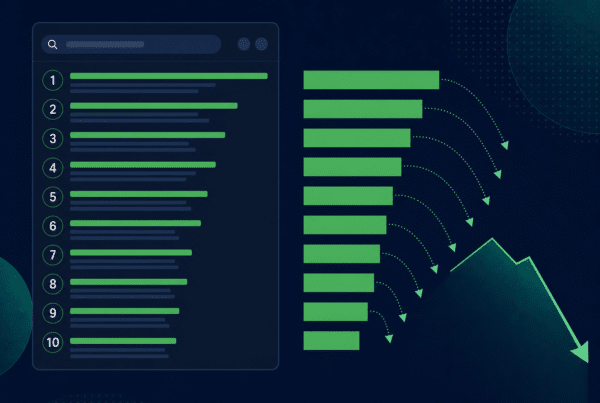
To judge whether a CTR is good or bad, you need a rough sense of what is normal for the spot you rank in. CTR drops fast as you move down the page. As a loose benchmark, the top organic result often earns somewhere in the range of 25 to 35 percent of clicks, position three drops to roughly 10 percent, and by the bottom of page one you are frequently into low single digits. Page two is mostly impressions with very few clicks. These numbers move around a lot depending on the query, the device, and how many ads or SERP features sit above you, so treat them as a sanity check rather than a target.
The practical use is this. If a page sits at position 3 with a 2% CTR, that is well below what the position should deliver, so the title and snippet are the prime suspects. If a page sits at position 18 with a 0% CTR, that is normal for the spot, and the fix is ranking, not copy. Always read CTR against position. A number on its own tells you almost nothing.
A simple workflow to turn the gap into action
Here is the loop we run, and it takes about an hour a month per site once you have done it once.
- Pull the last 3 months of the Search Console performance report, by page and by query, with all four metrics turned on.
- Sort by impressions, then find pages with high impressions and a CTR below what their position should earn. These are your title and snippet fixes.
- Filter for strong CTR, low impressions. These are your visibility fixes: better content, internal links, cluster support.
- Check position trend. If impressions are up but position is sliding, you are spreading thin across weaker queries, not winning. That can be an early sign of content decay.
- Confirm intent in GA4. Clicks get people to the page. Check whether they stay, scroll, and convert, so you do not chase clicks that bounce.
- Pick five pages and act. Rewrite titles on the high-impression group, improve and interlink the low-impression group, and leave the noise alone.
That last step matters. The point of reading impressions vs clicks is not to admire the charts. It is to walk away with a short, ranked list of pages to change and a clear reason for each one. If you want the broader set of numbers that sit around this, our breakdown of content analytics metrics covers what to track beyond these four.
Common mistakes when reading impressions vs clicks
A few traps catch even experienced teams:
- Celebrating impressions. Rising impressions with flat clicks is not growth. It is often just more visibility on queries that do not convert.
- Reading CTR without position. A 1% CTR at position 2 is a problem. The same 1% at position 25 is normal. Context decides everything.
- Comparing pages with very different intent. A how-to guide and a pricing page will never share a CTR benchmark. Group like with like.
- Ignoring SERP features. If an AI overview, a featured snippet, or a pack of ads sits above you, your clicks can fall even when your rank holds. The impression still counts; the click goes elsewhere.
- Chasing clicks that bounce. A clickbait title can lift CTR and tank everything after the click. Pair Search Console with engagement data before you call a fix a win.
Turn Search Console signals into a real content plan
Reading impressions vs clicks well is the difference between a dashboard you glance at and one that tells you what to do next. The pattern points to the page, the position points to the cause, and CTR tells you whether the work is copy or ranking. If you would rather hand this off, we map your Search Console and GA4 data to a prioritized list of pages to fix and a refresh schedule, so you can see exactly where the gap between impressions and clicks is costing you the most traffic.
Impressions vs clicks in Search Console: common questions
Quick answers on what impressions and clicks mean, what a good CTR looks like, and how often to review the gap.
What is the difference between impressions and clicks in Google Search Console?
An impression is counted every time one of your pages appears in someone’s search results for a query, whether or not they interact with it. A click is counted only when someone actually selects your result and lands on your site. So impressions measure how often you are visible, and clicks measure how often people choose you. Impressions are almost always much higher than clicks, because most people who see a result do not click it. The ratio between the two, your click-through rate, is usually the more useful number to watch.
Why are my impressions going up but my clicks staying flat?
Usually one of two things is happening. Either you are gaining visibility on queries where you rank too low to get clicked, often page two and beyond, which adds impressions but almost no traffic. Or you rank well but your title and meta description are not compelling enough to win the click against the other results. Check the average position for those pages. Strong position with flat clicks points to a title and snippet problem. Weak position points to a ranking problem that copy alone will not solve.
What is a good click-through rate in Search Console?
It depends almost entirely on your average position and the type of query. As a rough guide, the top organic result often earns 25 to 35 percent of clicks, falling to around 10 percent by position three and into low single digits near the bottom of page one. Branded searches can run far higher, and pages buried on page two earn very little regardless. The honest answer is to compare each page’s CTR against what its position should deliver, rather than chasing one universal target.
Should I worry about pages with high impressions and no clicks?
Look at the position first. If the page ranks in the top five and still gets no clicks, the title and description are letting you down and are worth rewriting. If the page ranks at position 20 or lower, near-zero clicks are completely normal, and the impressions are mostly noise from broad or loosely related queries. Do not pour effort into low-ranking pages just because the impression count looks big. Spend it where a small CTR or ranking gain turns into real traffic.
Do impressions help with SEO even if no one clicks?
Impressions themselves are not a ranking factor, so racking them up does not directly improve your SEO. What they do give you is information. A rising impression count shows Google is finding your page relevant to more queries, which can be an early sign that a topic is worth investing in. Low CTR on high-impression pages flags titles and snippets to fix. Used that way, impressions are a planning signal rather than a goal. The traffic still comes from clicks, and the value comes from what people do after.
How often should I review impressions vs clicks?
For most marketing sites, a monthly review is enough to catch trends without reacting to noise. Pull the last 90 days so you smooth out weekly spikes, look at performance by page and by query, and keep all four metrics visible. Watch for pages where impressions rise while position slips, which can be an early warning of decay, and for pages where a strong CTR is held back by low impressions. Quarterly, zoom out to see whether your overall click trend is keeping pace with impressions or falling behind.