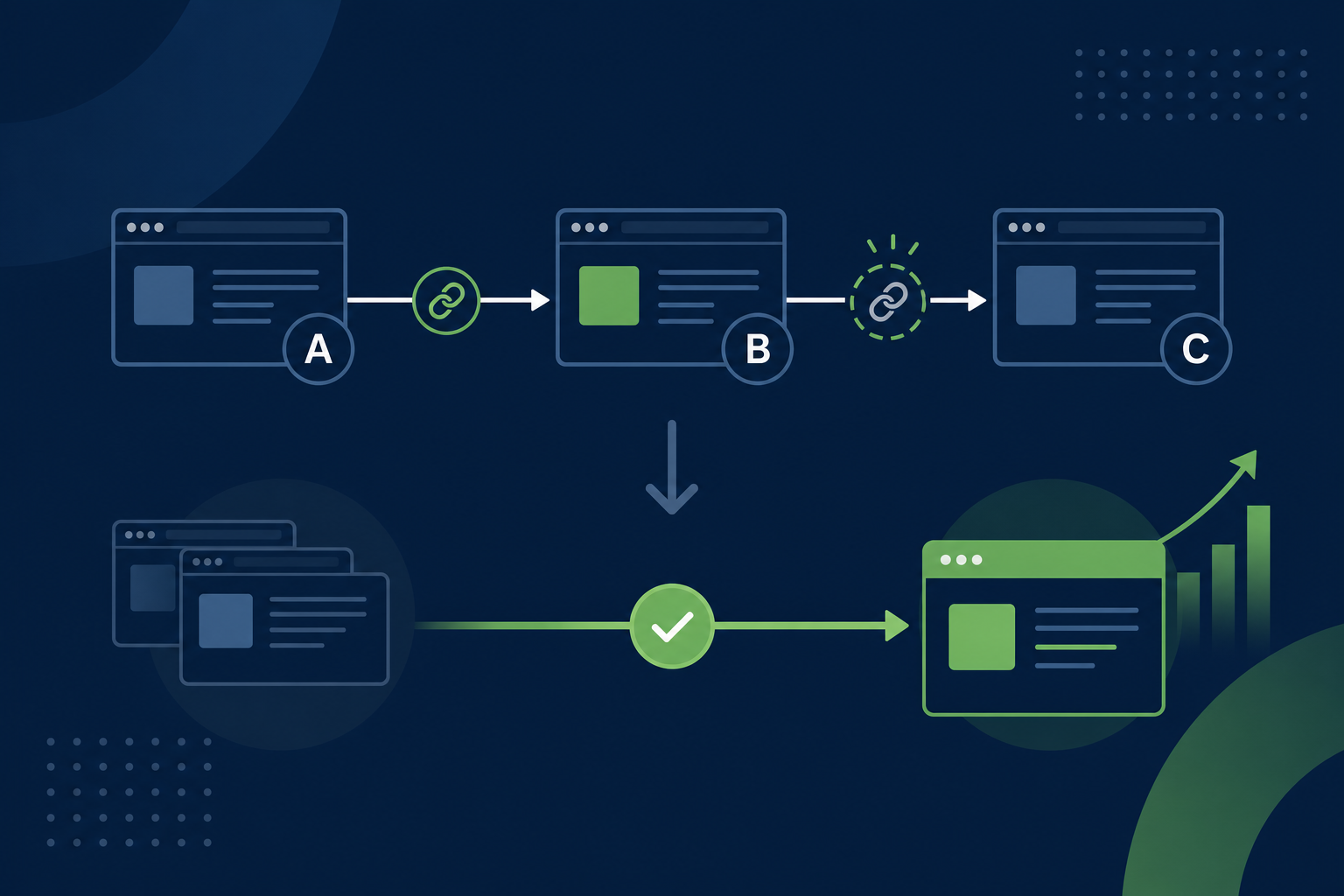
You merge three overlapping posts into one strong page. You set the redirects. Traffic should consolidate. Rankings should follow the new URL. Then someone on your team runs a crawl and finds a mess: old URL A points to B, B points to C, and C finally lands on the page you actually want. That is a redirect chain, and it is one of the most common leftovers after content consolidation.
Chains do not always break your site outright. That is part of the problem. Pages still load. Google still crawls. But each extra hop adds delay, dilutes signals, and makes it harder to tell whether your consolidation actually worked. This post explains how redirect chains form after merges, what they cost you, and how to flatten them without creating new problems.
What a redirect chain is (and what it is not)
A redirect chain happens when a URL does not go straight to its final destination. Instead, it passes through one or more intermediate URLs first.
Example: you retired /blog/old-post-a/ years ago and pointed it to /blog/old-post-b/. Later you merged B into a new pillar at /content-analytics/metrics-guide/ and redirected B there. Now A goes to B, then to the pillar. That is a two-hop chain. Add a third merge or a trailing-slash fix and you can stack more.
A redirect loop is different. The URL bounces between two or more addresses and never settles. Browsers show an error. Crawlers give up. Loops are urgent. Chains are quieter, but they still deserve a fix.
One hop vs a chain
A single 301 from an old URL to its replacement is normal and expected. Google handles that fine. The trouble starts when the replacement URL is itself a redirect. Two hops is already worth cleaning up on high-traffic URLs. Three or more is a clear maintenance issue, especially on pages that used to rank or still earn backlinks.
Why redirect chains show up after content consolidation
Consolidation is rarely a one-time event. Marketing blogs accumulate overlapping posts over years. Each cleanup adds redirects. Chains form when nobody maps the full path.
Here are the patterns we see most often:
- Layered merges. Post A was redirected to B in 2022. In 2025 you merged B and C into D but only updated B’s redirect. A still points at B.
- Category or slug changes in the middle. You moved a post to a new folder, then later merged it into a hub page. The first redirect stayed live.
- Plugin and server rules stacking. Redirection plugin rules,
.htaccessentries, and CDN edge redirects can each add a hop if they are not coordinated. - HTTP to HTTPS and www fixes. A URL might hit a protocol redirect, then a www redirect, then your content merge redirect before the final page.
- Trailing slash and case mismatches. Small inconsistencies create extra hops that look harmless in isolation but add up across a site.
None of this means consolidation was the wrong call. Merging thin or overlapping content is still one of the best ways to fight content decay. The issue is execution detail: redirects need the same discipline as the content itself.
What redirect chains actually cost you
Chains are not a moral failing. They are a small tax on every request that hits them. The tax shows up in a few places.
Crawl efficiency
Search engines follow redirects, but each hop spends crawl budget and adds latency. On a large blog with hundreds of chained URLs, crawlers spend time bouncing through history instead of re-crawling the page you care about. That matters more on mid-size sites that publish often and refresh frequently.
Page speed and user experience
Every redirect is a round trip before the page loads. One extra hop might cost only milliseconds. On mobile or slow connections, stacked hops are noticeable. If the chain crosses HTTP and HTTPS or different hosts, the delay grows.
Signal clarity after a merge
When you consolidate content, you want authority from old URLs to flow to the new canonical page. Google has said it can follow multiple redirects in a chain and consolidate signals to the final URL, but the process is slower and less certain than a direct 301. For important merges, a direct path is the safer bet.
Reporting noise
Analytics and Search Console can split history across URLs in a chain if redirects were added at different times. You may think a merge failed when traffic is still attributed to an intermediate URL. Clean redirects make before-and-after measurement easier, which is core to good content analytics.
How to find redirect chains on your site
You do not need exotic tools. You need a crawl that follows redirects and a list of URLs you touched during consolidation.
- Export URLs from the merge project. Every retired URL, every intermediate URL, every new canonical. If you ran a ROT review or decay audit, start with that list.
- Crawl with redirect tracing. Screaming Frog, Sitebulb, or similar tools report redirect chains and loops. Set the crawler to follow redirects and flag sequences longer than two hops.
- Check your redirect plugin. If you use Redirection or Rank Math redirects, search for rules whose target URL is itself redirected elsewhere.
- Spot-check high-value URLs. Use a header checker or curl (
curl -I -L) on URLs that had backlinks, ranked on page one, or drove conversions. Confirm they resolve in one hop to the final page. - Compare sitemap to reality. Retired URLs should not sit in your XML sitemap. If they do, crawlers and tools will keep treating them as live.
Prioritize chains on URLs with traffic, links, or recent impressions in Search Console. Fixing a chain on a dead URL nobody requests is low impact. Fixing a chain on a URL that still shows up in GSC is high impact.
How to flatten redirect chains the right way
Flattening means pointing every URL in the chain directly at the final destination. No detours.
Using the earlier example: if A → B → pillar, do not leave A pointing at B. Point A straight at the pillar. Point B at the pillar too. Every retired URL gets one rule, one target, the live page.
Rules that keep flattening safe
- Use 301 for permanent merges. Content consolidation is a permanent move. Temporary 302s confuse crawlers and belong in short-lived campaigns, not archive cleanup.
- Update the source rule, not just the latest redirect. When a destination changes, walk back through old redirect rules. The mistake is updating only the most recent merge.
- Pick one source of truth. If both your CDN and WordPress plugin redirect the same path, you can double-hop or conflict. Document where redirects live: plugin, server config, or edge rules.
- Keep a redirect map spreadsheet. Columns: old URL, current target, date changed, owner. Future you will merge again. The map prevents chains from reforming.
- Leave the final URL alone. The canonical page should return 200. It should not redirect anywhere else.
When to remove an intermediate URL entirely
Sometimes the middle URL in a chain was another retired post with no traffic and no links. After flattening, you can drop references to it in internal links and sitemaps. You do not need a live page at B if B was only a stepping stone. You do need A to skip B and land on the pillar.
A consolidation redirect workflow that avoids new chains
Chains are easier to prevent than to unwind. When you merge content, run this sequence before you announce the project done.
- Choose the canonical URL first. One page wins. Everything else is a retiree. Write that down before anyone edits redirects.
- List every URL to retire. Include variants: trailing slash, http, old category paths, PDF duplicates if applicable.
- Search for existing redirects to retirees. Before adding new rules, check what already points at those URLs. Those sources will become part of your chain if you miss them.
- Point every retiree directly at the canonical. Do not point retiree A at retiree B even if B’s content was folded in. Both go to the winner.
- Update internal links in the surviving content. Redirects are a safety net. Internal links should point at the new URL in the first place.
- Request re-crawl in Search Console. Inspect the canonical URL and submit for indexing. Check retired URLs show the expected redirect in the URL Inspection tool.
- Re-crawl in 48 hours. Confirm zero chains on your merge list. Traffic and impression data will lag; technical checks should not.
This fits naturally into a living content practice: consolidation is not a fire-and-forget launch. It is a change you verify, measure, and revisit when analytics say something still points the wrong way.
Common mistakes after merging blog posts
A few habits recreate chains right after a cleanup:
- Redirecting to a “helpful” intermediate page. Teams point old posts at a related category archive or tag page instead of the new pillar. Later the pillar replaces that stopover. Chain created.
- Fixing only the URL you remember. The visible post gets updated. Older slug changes buried in the redirect plugin do not.
- Mixing 302 and 301 during testing. A “temporary” rule ships to production and never gets upgraded.
- Forgetting PDFs, images, or attachment URLs. They rarely matter for rankings, but they add noise in crawls and analytics.
- Calling the merge done before analytics review. If impressions cling to a retired URL weeks later, something in the chain or canonical setup is still off. Our guide on why website traffic is dropping covers how to read those signals after structural changes.
Turn consolidation into traffic you keep
Content consolidation should leave you with fewer, stronger URLs and a redirect map that points straight at them. Redirect chains are the friction that keeps old paths alive in the background, slowing crawlers and muddying your data. Flatten chains on high-value URLs, document every rule, and bake redirect checks into the merge workflow so the next consolidation does not stack on top of the last one.
If you want a second set of eyes, we audit merge lists, crawl for chains, and align redirects with the pages your Search Console data says still matter.
Redirect chains after content consolidation: common questions
Quick answers on what redirect chains are, when they hurt SEO, and how to fix them after merging blog posts.
What is a redirect chain?
A redirect chain is a sequence where one URL redirects to another, which redirects to another, before reaching the final page. For example, an old blog post might redirect to a newer post, which later redirects to a consolidated pillar page. Each hop adds latency and makes it harder for crawlers and analytics tools to treat the move as a clean, direct transfer of authority.
How many redirects in a chain is too many?
One redirect from an old URL to its replacement is normal. Two hops is worth fixing on URLs that still get traffic, backlinks, or Search Console impressions. Three or more is a clear problem on any URL that matters to your business. There is no official search engine penalty for chain length alone, but extra hops slow loading, waste crawl budget, and make signal transfer less predictable after a merge.
Do redirect chains hurt SEO after content consolidation?
They can slow the benefits of a merge. Google can follow multiple redirects and consolidate ranking signals to the final URL, but a direct 301 is cleaner and faster for crawlers. Chains also make it harder to tell whether a consolidation worked, because traffic and impressions may linger on intermediate URLs. For important merges, flatten chains so every retired URL points straight at the canonical page.
Should I redirect every old URL when merging blog posts?
Redirect every old URL that had traffic, rankings, backlinks, or internal links pointing at it. If a URL never earned impressions and has no links, you may choose to return 410 Gone instead, but that is a deliberate call, not a default. When in doubt, use a direct 301 to the new canonical page. The goal is to carry users and signals forward, not to leave dead ends.
What is the difference between a redirect chain and a redirect loop?
A chain eventually reaches a final page, even if it takes several hops. A loop bounces between URLs endlessly and never resolves, which breaks the page in browsers and stops crawlers. Chains are a maintenance and efficiency problem. Loops are an outage. Both deserve fixes, but loops are urgent because the URL is effectively broken for everyone.
How do I test redirects after merging content?
Start with a crawl tool that reports redirect chains, or run curl with headers on each retired URL to see the full path. Check that every old URL resolves in one hop to the canonical page with a 301 status. Use Google Search Console URL Inspection on both the old and new URLs. Re-crawl your merge list within a few days of launch to confirm no new chains appeared in plugins, server rules, or CDN settings.